Online file tools are useful when a small document task is blocking you: remove pages, compress a PDF, convert images, or clean image metadata. The security decision is not “online tools good” or “online tools bad.” The decision is whether a specific file is appropriate for a specific workflow with a clear processing disclosure.
For this refresh, I tested a browser-local NexKit image tool with a generated WebP fixture and checked a server-side OCR route from the product source against production. The browser-local test produced no POST, PUT, or PATCH requests while processing the file. The OCR route is registered as a backend/server-side type in source, but the public /ocr-pdf route currently returns 404, so this article does not present OCR as an available NexKit workflow.
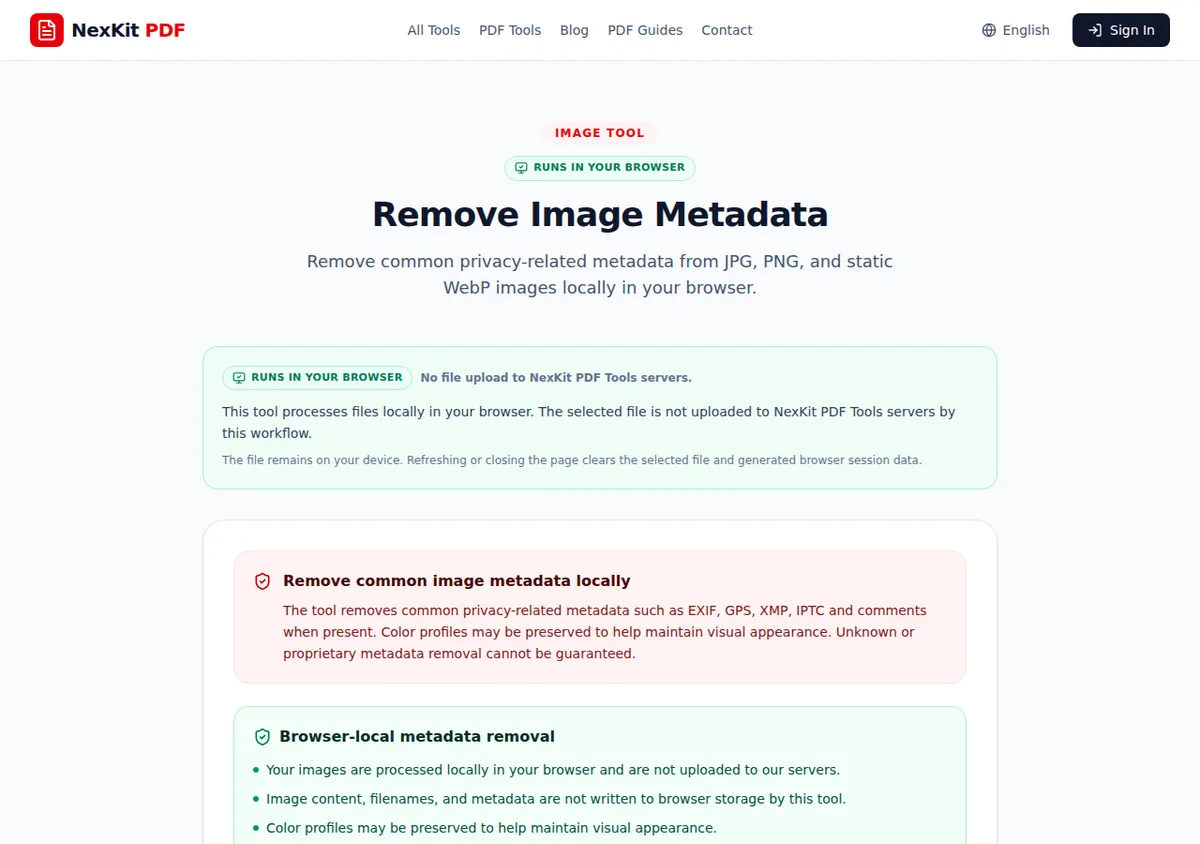 The tested browser-local tool disclosed local processing and no NexKit server upload for that workflow.
The checklist
Use this checklist before selecting a file:
- What kind of information is in the file?
- Does the tool page say where processing happens?
- Does the task require uploading file bytes to a server, or does it run locally in the browser?
- Is there a privacy policy or file deletion policy that explains the workflow?
- Are you using HTTPS on the intended domain?
- Can you remove unnecessary pages or metadata before processing?
- Will you inspect the downloaded output before sharing?
- Does your organization require a different approved system for this file?
HTTPS matters because it protects traffic in transit between the browser and site. MDN describes HTTPS as HTTP using TLS encryption. That does not mean a site, workflow, file choice, or final sharing decision is automatically safe. Treat HTTPS as a baseline transport requirement, not as a full file-safety decision.
1. Classify the file before choosing the tool
Put the file into one of three working buckets:
- Routine: public PDFs, non-sensitive screenshots, forms already intended for public upload, generic diagrams.
- Careful: client drafts, internal reports, signed forms, finance files, contracts, or images that may contain metadata.
- Restricted: identity documents, health records, payroll, confidential customer exports, regulated records, source code, or anything your policy says must stay in approved systems.
Routine files may be appropriate for a browser utility. Careful files need minimization first. Restricted files should follow the relevant policy before any web-based utility is used.
If the document needs a preparation pass, use the prepare client documents before uploading online guide before opening a tool.
2. Read the processing disclosure on the specific tool
Do not assume all tools on a site process files the same way. NexKit tool pages show processing labels such as browser-local or temporary server processing where applicable.
For the tested Remove Image Metadata workflow, the production page states that JPG, PNG, and static WebP images are processed locally in the browser and are not uploaded to NexKit servers by that tool. I tested a generated static WebP file and captured no POST, PUT, or PATCH network requests during the workflow.
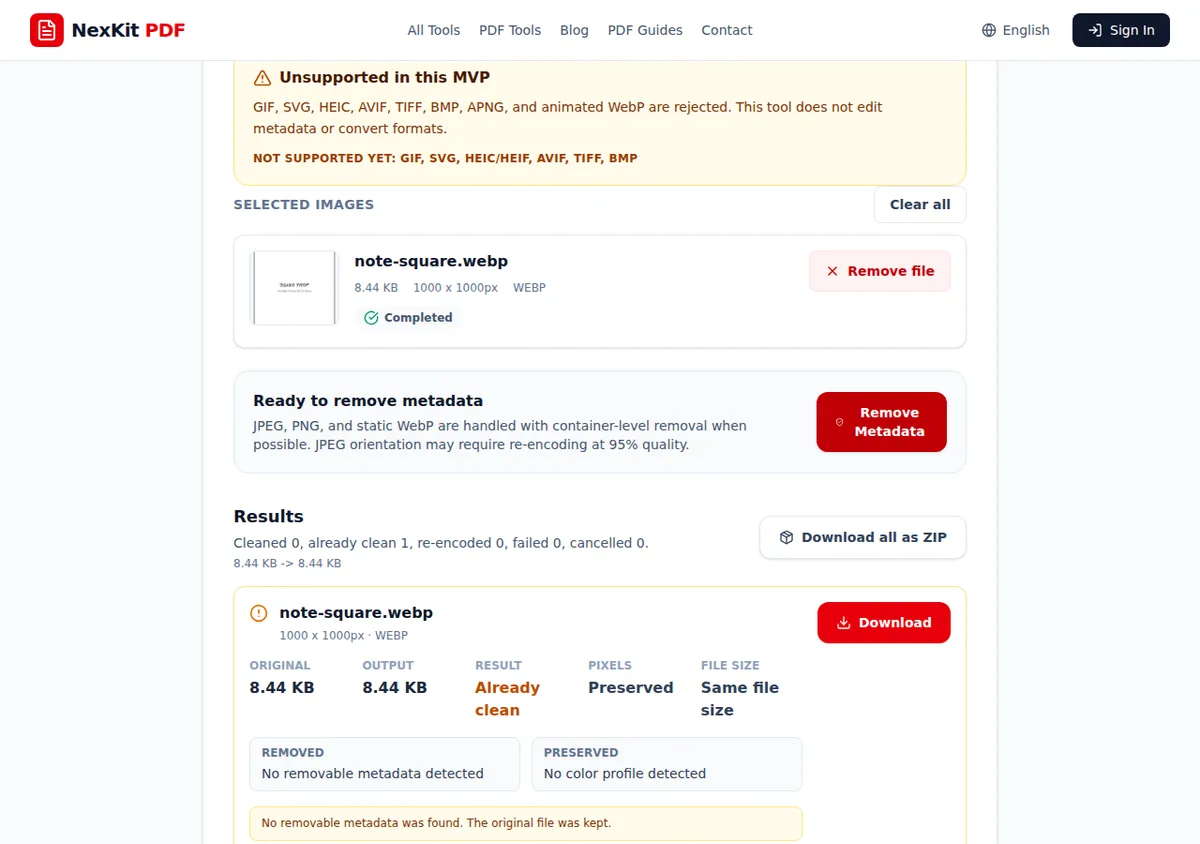 The generated WebP test completed in the browser. The fixture had no removable metadata, so the tool reported it as already clean.
That evidence supports browser-local wording for this specific tool. It does not support a blanket claim that every NexKit tool or every online file tool never uploads files.
3. Minimize the file
Only process the pages or images needed for the task. If a PDF contains private attachments but you only need a public section, split or remove pages first. If an image contains visible private details, crop or redact outside the tool before processing.
Useful minimization tools include:
- Remove PDF pages for pages that should not remain in the working copy.
- Split PDF for separating private sections from routine review material.
- Remove Image Metadata for common EXIF, GPS-related EXIF, XMP, IPTC, and comment metadata where present.
The metadata tool is not forensic anonymization. The production page says unknown or proprietary metadata removal cannot be guaranteed, and color profiles may be preserved to maintain visual appearance.
4. Check policy pages when the workflow is sensitive
For NexKit, use the product-specific Privacy Policy and File Deletion Policy when a workflow involves file handling questions. Use Contact if you need a support or privacy clarification before processing a file.
The practical rule is simple: if the policy does not answer the question you need answered for a sensitive document, do not process that document until the question is resolved.
5. Inspect output and sharing separately
Security does not end when the tool finishes. Open the result and check:
- Did the output include only the intended pages or images?
- Are hidden notes, comments, or private attachments still present?
- Is the file name clear enough for the recipient?
- Does the final sharing channel have the right permissions?
- Is a password or policy-controlled storage required?
If access controls matter after preparation, the PDF password protection sharing guide explains where passwords help and where proper storage or permissions are still required.
A practical decision table
| Situation | Safer action |
|---|---|
| Public brochure needs compression | Use a tool with clear processing disclosure, then inspect readability. |
| Client packet includes unrelated private pages | Split or remove pages before processing. |
| Image may contain GPS metadata | Use metadata removal, then remember visible content still matters. |
| Regulated or confidential document | Follow your approved internal workflow first. |
| Tool disclosure is unclear | Do not use it for sensitive material until clarified. |
Final rule
Use the smallest file, the clearest tool, and the most specific processing disclosure. Browser-local processing can reduce server-upload exposure for the tested workflow, but it does not remove the need to classify the file, review the output, and share it carefully.
References and related tools
- MDN: HTTPS for the baseline transport-security concept.
- NexKit PDF Tools Privacy Policy for product-specific privacy information.
- NexKit File Deletion Policy for file lifecycle notes.
- Remove PDF pages and Split PDF for minimizing PDF content before processing.